
Screenshots


App details
- Version
- 1.1
- Size
- 928.35 KB
- Updated
- July 2, 2024
- Requires
- Windows 11
- Language
- English
- License
- Free
- Developer
- Hero Medical
- Category
- Windows OS
SoftPas in:
This product is also available in the following languages:
About WSnip
Download WSnip – Free Text Editing and Document Management Tool
Overview
WSnip is a versatile, lightweight program built for anyone who works with large volumes of text and needs a fast, reliable way to extract, edit, and re‑format content from multiple sources. Whether you are a researcher pulling quotes from web pages, a marketer assembling copy for brochures, or a student compiling notes from PDFs, WSnip gives you a single workspace where you can drag‑and‑drop text snippets, edit them in real time, and arrange the layout for printing or digital distribution. The tool stands out by supporting mixed‑media documents that contain images, charts, or graphs, allowing you to preserve visual context while tweaking the surrounding text. Its intuitive interface eliminates the need for bulky word processors when you simply want to clean up copied text, remove hidden formatting, or batch‑process multiple files. WSnip runs on Windows, macOS, and even offers a mobile companion for Android and iOS, making it a truly cross‑platform solution for modern document workflows.
Key Features
- Drag‑and‑Drop Text Capture: Select any text on a web page, PDF, or other document and drop it directly into WSnip for instant editing.
- Mixed‑Media Support: Handles documents that include images, tables, or graphs, preserving visual elements while you edit surrounding text.
- Live Preview & Layout Control: See changes in real time and rearrange paragraphs, headings, or bullet points with simple mouse gestures.
- Batch Processing: Import multiple files at once, apply global find‑replace, and export all edited content in one click.
- Export Options: Save edited snippets as plain text, Rich Text Format (RTF), or PDF for immediate printing or sharing.
- Cross‑Platform Sync: Cloud‑based sync lets you continue editing on Windows, macOS, Android, or iOS without losing your work.
- Secure Clipboard Management: All captured data stays within the application; no external clipboard services are used, ensuring privacy.
- Customizable Keyboard Shortcuts: Tailor shortcuts for common actions like “Extract,” “Clean Formatting,” and “Export.”
- Automatic Updates: Free updates are delivered securely, keeping the tool compatible with the latest OS versions.
Installation, Usage & Compatibility
Getting started with WSnip is intentionally straightforward. After you download the installer for your operating system, run the executable (Windows) or the .dmg package (macOS). The installer guides you through a typical wizard: accept the license agreement, choose an installation folder, and click “Install.” For mobile devices, locate “WSnip” in the Google Play Store or Apple App Store, tap “Install,” and grant the necessary permissions for storage access.
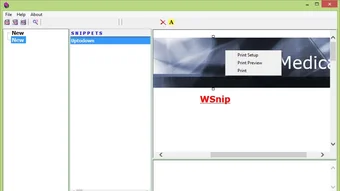
Once installed, launch the application. The main window is divided into two panels: the left pane shows a “Snip Queue” where dropped text snippets appear, and the right pane displays a rich‑text editor. To capture text, simply highlight it in any other program, press Ctrl+Shift+S (or the custom shortcut you set), and the selection will instantly appear in the Snip Queue. From there you can double‑click a snippet to open it in the editor, clean up hidden HTML tags, adjust fonts, or insert images that were part of the original source.
WSnip runs on the following operating systems:
- Windows 10, 11 (64‑bit)
- macOS 12 Monterey and later
- Android 8.0 and later
- iOS 13 and later
System requirements are modest: a minimum of 2 GB RAM, 150 MB of free disk space, and a modern processor (Intel i3 or equivalent). Because the app relies on native UI components, performance is smooth even on low‑end laptops or tablets. After you finish editing, use the “Export” button to choose your preferred format. For printing, the built‑in PDF generator respects page margins and headers you define, so you can produce a clean, printable document without opening a separate word processor.
Pros, Cons & Frequently Asked Questions
Pros
- Fast drag‑and‑drop workflow eliminates copy‑paste errors.
- Supports mixed media, preserving images and graphs alongside text.
- Lightweight and runs on all major desktop and mobile platforms.
- Free to use with regular, secure updates.
- Customizable shortcuts and cloud sync improve productivity.
Cons
- Advanced formatting (styles, tables) is limited compared to full‑featured word processors.
- No built‑in OCR; you must extract text from scanned images using third‑party tools.
- Collaboration features are basic; real‑time multi‑user editing is not available.
FAQ
Is WSnip really free?
Yes, WSnip is a completely free tool. All core features, including drag‑and‑drop capture, mixed‑media handling, and export options, are available at no cost. Optional premium plugins may be offered in the future, but the base application remains free.
Can I use WSnip to extract text from PDFs?
Absolutely. Open a PDF in any viewer, select the desired text, and use the WSnip shortcut or right‑click menu to snip it directly into the application. The tool preserves line breaks and basic formatting while stripping hidden PDF tags.
Does WSnip keep my data secure?
Yes. All captured content stays on your device unless you enable cloud sync. The sync service uses end‑to‑end encryption, and no third‑party clipboard utilities are involved, ensuring that sensitive information remains private.
How do I update WSnip?
When a new version is released, WSnip displays an unobtrusive notification inside the app. Clicking “Update” downloads and installs the latest build automatically. You can also enable automatic updates in the Settings menu.
Can I export edited snippets as a single PDF?
Yes. After arranging multiple snippets in the editor, choose “Export → PDF” and WSnip will merge them into a single, print‑ready document. You can also set page headers, footers, and custom margins before exporting.
Conclusion & Call to Action
WSnip fills a niche that many larger word processors overlook: a fast, secure, and cross‑platform environment for capturing, cleaning, and repurposing text from a variety of sources. Its drag‑and‑drop workflow, mixed‑media handling, and cloud sync make it especially valuable for researchers, content creators, and students who need to streamline the often‑tedious process of extracting and formatting information. While it doesn’t replace a full‑featured editor for complex document design, it excels as a lightweight companion that saves time and reduces clutter.
If you regularly copy text from web pages, PDFs, or other documents and want a dedicated space to tidy up that content before publishing or printing, WSnip is the tool to try. Download it today, explore the free features, and experience a smoother document‑management workflow.
Ready to boost your productivity? Click here to download WSnip now and start editing smarter.
Guides & Tutorials
How to install WSnip
- Click the Download button above.
- Once redirected, accept the terms and click Install.
- Wait for the WSnip download to finish on your device.
How to use WSnip
This software is primarily used for its core features described above. Open the app after installation to explore its capabilities.
User Reviews
No reviews yet. Be the first to share your experience.
You may also like
more
Llama 2
Free-to-use large language model As the new addition to Meta’s arsenal of langua...

NotebookLM
Revolutionizing the note-taking and idea-generation process NotebookLM is an exp...

Github co pilot
AI-inspired software development and coding platform GitHub Copilot is a browser...

Google Gemma
Google’s lightweight AI models Introducing Google Gemma , a family of cutting-ed...

AI Image Enlarger
A free app for Windows, by ai-image-larger. AI Image Enlarger is a free software...

DALL E
AI-driven text-to-image transformation engine DALL·E is a free graphic and desig...